🐝
YouTube chat intelligence

Understand your
live audience.

See what your audience reacts to, the messages behind each trend, the accounts shaping the conversation—and how your live community is getting stronger.

▶ YouTube Free to connect · choose what to scan before analysis runs
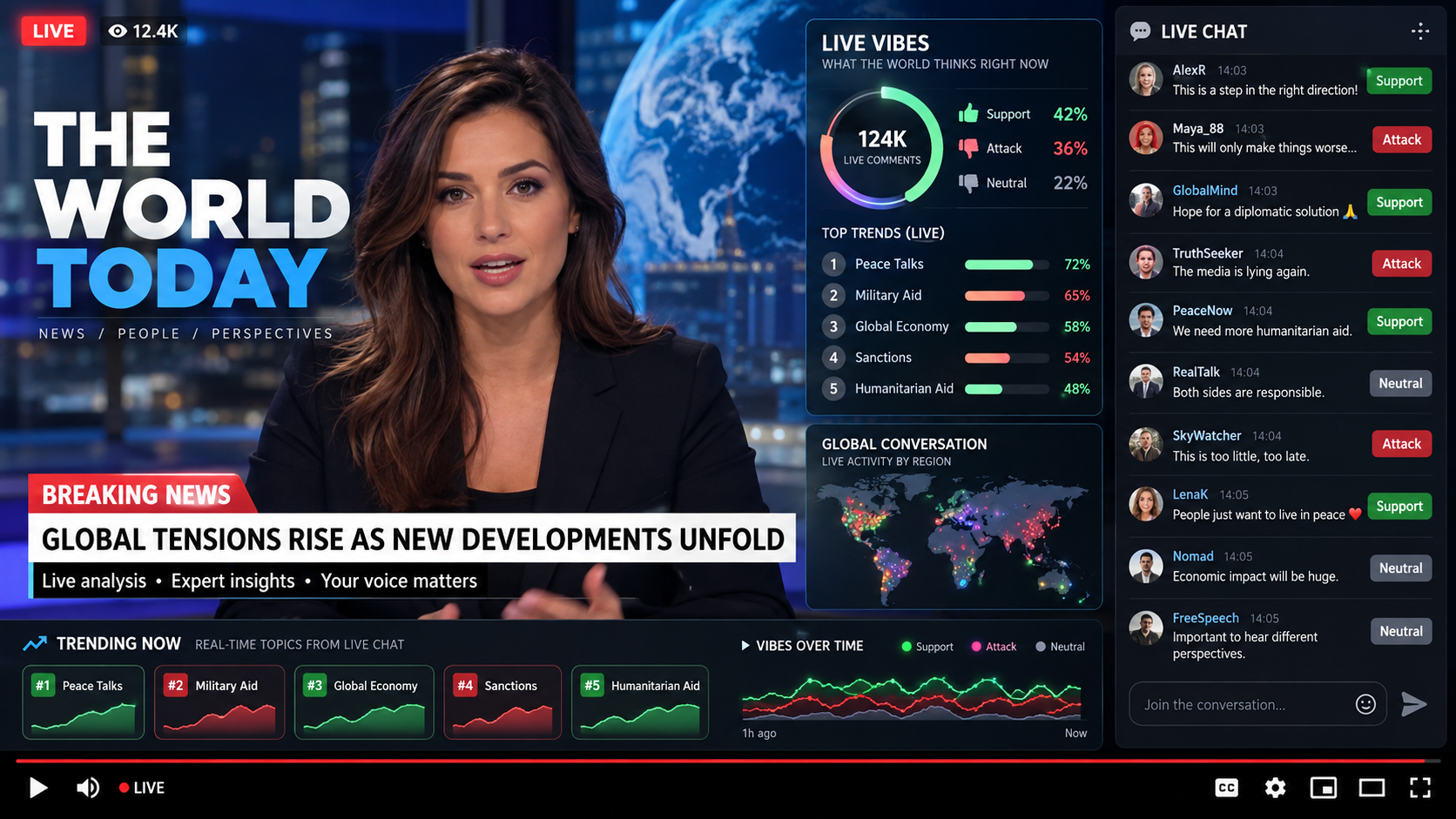
YBees live monitor showing a news broadcast, live vibes, trending topics, and a live chat
🔴 LIVE
👁 12.4K
Global news
live desk
BREAKING NEWS
Global leaders meet to discuss a new peace plan
What viewers think right now
124K
live comments
👍Support42%
👎Attack36%
●Neutral22%
1
New sponsor deal72%
2
Server outage35%
3
Co-host debut58%
💬 Live Chat 12.4K online
A
Alex R14:03Support
Hope this is a step in the right direction!
M
Maya_8814:03Attack
This will only make things worse...
G
GlobalMind14:04Support
Hope for a diplomatic solution 🙏
T
TruthSeeker14:04Attack
The media is lying again.
P
PeaceNow14:05Neutral
We need more humanitarian aid.
Join the conversation... ◉
Vibes over time Support Attack Neutral
Vibe Screen Display

Make the room part of the show.

Vibe Screen turns your live chat into a beautiful, living audience display. Keep the conversation visible beside your stream—not buried in a scrolling chat panel.

🫧See what is taking off. Topics grow into bubbles as the audience gives them attention.
↕Read the room at a glance. Supportive and critical reactions animate directly on each trend.
🖥️Use one link everywhere. Run it in OBS, on a second display, or share it as a viewer companion.
Explore Vibe Screen →
ybees.ai · Vibe Screen● live
Peace
talks
Ukraine
Global
news
Ceasefire
Aid
Channel intelligence

See which conversations grow together.

Trend Clusters maps the topics your unique viewers mention together, so you can see the themes and tensions shaping your channel’s conversation.

◎Size by unique voices. A larger bubble means more individual viewers mentioned that trend.
↔Find real intersections. Connections show viewers who mentioned both topics.
±Read the stance. Switch between supporting and attacking clusters without losing the context.
Explore Trend Clusters →
Co-mentioned by unique viewers
Ukraine
Sanctions
NATO
Economy
support-led attack-ledconnections = shared viewers
The community benchmark

Your live community, in one score.

The YBees Community Momentum Score turns your completed live-chat replays into a clear, comparable 0–100 view of audience participation—and shows the next improvement with the most leverage.

✦Transparent by design. It measures live-chat community health, not views, watch time, revenue, or YouTube recommendations.
See your Community Score →
76
Momentum
What drives itCOMPLETE REPLAYS
Returning voices76
Conversation breadth82
Participation spread51
Recent momentum73

Highest-leverage next step: invite quieter viewers into the discussion with a direct question or poll.

From channel to clarity

Get a useful answer in three steps.

  1. 1
    Connect or track a channel

    Use your own channel or follow a public YouTube channel.

  2. 2
    Choose videos to scan

    Start with one stream or bring in the history you need.

  3. 3
    Follow the evidence

    Open the trends, messages, people, and moments behind the signal.

The conversation, made legible

See the signal.
Then see who moved it.

YBees turns a fast-moving live chat into evidence you can understand in the moment — and act on with confidence.

The live moment

See the shift while the conversation is still unfolding.

Topics rise and fall as the conversation moves. Follow the live shift, open the messages behind it, and keep the important moment in view.

  • Topics ranked as the conversation unfolds
  • Support, criticism, and neutral reaction in one glance
  • Every movement leads back to the messages that caused it
● LIVE VIBES2,842 messages72%
#1Ceasefire talks72%
#2Humanitarian aid58%
#3Military support35%
The answer, without the hunt

Ask the question that matters.

Use plain language to move from a hunch to the messages, people, and trend that explain it.

  • Ask about any stream or time window
  • Get the evidence with the answer
  • Follow the next useful question, not another dashboard
What changed in the last ten minutes?
Humanitarian aid discussion rose 31%. The change started with 48 messages after the guest's announcement.
Show me the messages.
The broadcast layer

Bring the signal on air.

Place a clean, configurable live overlay in OBS so your audience can see the pulse without losing the program.

  • Designed for an actual broadcast, not a dashboard
  • Trends and messages update live
  • One browser-source link per channel
YBees live broadcast overlay
💬
Real-Time Analysis
Instantly analyze live chat and comments
📈
Trending Topics
Discover what's going viral as it happens
🌐
Global Perspective
See conversations from around the world
📊
Actionable Insights
Turn audience vibes into real decisions
Pollination

Watch who's cross-pollinating your channels — and whether they stick around.

The same handful of accounts often comment across several of your streams at once — sometimes fans, sometimes a coordinated swarm. YBees maps that traffic automatically, then tracks whether that shared audience actually keeps coming back week over week, not just whether they showed up once.

How it collects

A weekly retention heatmap for every audience you share.

Connect a channel free, then pick how much history to pull in — one video, a batch, or up to a year — and YBees scans exactly that. Every buzzer's first-seen week becomes a cohort row; each column after it shows what share of that same group is still active — real return-rate data, not a one-time overlap snapshot.

  • Scan depth is your call — a single video up to a full year back
  • Cross-channel overlap surfaced the moment a pattern repeats
  • Week-by-week retention per cohort, so you can see if a shared audience is growing stickier or churning out
Pollinating data…
Wk 0+1w+2w+3w
Jul 7
100%
58%
41%
33%
Jul 14
100%
62%
47%
—
Jul 21
100%
68%
—
—
Clashes

See the fight before it becomes the whole chat.

A stinger drops one comment, then a swarm answers it. YBees renders that as a live graph — who attacked, who defended, and who's worth banning before it derails your stream.

How it detects

Every reply gets a line — attack, support, or neutral.

YBees threads replies into a network graph in real time, weighting each edge by toxicity and stance so a genuine pile-on stands out instantly from ordinary banter.

  • Reply graph updates as fast as messages arrive
  • Each node scored on toxicity, karma, and community reception
  • One-click ban recommendation with the evidence attached
S
attack support
U
@Unionize_the_ai
STINGER · Ban recommended
95%
Vibes

Know the mood before you read a single message.

Every comment gets classified support / neutral / attack toward whatever your chat is actually talking about, so a trending topic reads as a mood, not a wall of text.

How it reads the room

Sentiment, tracked per topic, per entity, per minute.

Ask "how's chat feeling about the new merch drop" and get an actual answer — a trend line, a support/attack split, and the messages that moved it.

  • Sentiment trend line for the whole stream or one topic
  • Per-entity breakdown — people, brands, games, anything mentioned by name
  • Historical trends going back a full year
New merch drop7.2k mentions
Sponsor segment4.6k mentions
New game update3.4k mentions
Co-host debut3.0k mentions
Ask YB

Talk to the hive mind. Literally — or just type.

Ask YB sits over your whole account — billing, trends, ban candidates, cross-channel overlap and retention, even what your own bot labels mean — and answers in plain language, using only data it actually queried, never invented.

  • Ask by voice — dictate a question, review it, send
  • Cross-channel questions across everything you track on Pollination
  • "What's a Stinger?" — it explains its own vocabulary too
  • Every answer comes with 3 smart follow-ups to ask next
🎤 кого забанить?
3 accounts flagged this stream — @Unionize_the_ai (95% toxicity, coordinated timing), plus two lower-confidence stingers. Want the full evidence?
is my audience sticking around across channels?
Stingers

Bots don't hide from a hive that knows its own members.

Karma, community reception, and content patterns combine into one ban recommendation — ranked, not just flagged, so you know exactly who to remove first.

How it ranks

High-confidence stingers rise straight to the top.

Every account gets scored the same way a real moderator would think about it — not just "posted a lot," but posted a lot of the wrong thing, to the wrong reception, in the wrong pattern.

  • Ban recommendations sorted by confidence, not recency
  • Reused across live monitoring, historical scans, and Ask YB
  • One click removes a stinger from the hive
@swarm_seller_88
high · 97%
🚫 Ban
@link_in_bio_bot
high · 91%
🚫 Ban
@giveaway_ghost
med · 68%
@copypasta_carl
med · 54%
Pricing

Pay only for what gets analyzed.

No subscriptions, no seats, no plan to pick. Connect for free, top up a wallet, and it drains in fractions of a cent as your chat actually gets classified.

🐝
Connect free
Linking a channel, browsing your dashboard, and historical scans past the trial cost nothing on their own.
💳
Top up a wallet
Add any amount via Stripe, whenever you want. Balance never expires and rolls over month to month.
🍯
Billed per message
Every chat message that gets bot- and sentiment-classified draws a tiny amount — nothing else is metered.

$1–$3 / 1,000 messages
Real rate, pulled straight from actual billing, not a guess — comments cost the least; live chat replay (which requires dedicated YouTube quota to pull) costs a bit more. Analysis pauses automatically at zero balance, so there's no surprise bill. draining live
Get Started

Your chat has a vibe.
Time to feel it. 🐝

Connect your own channel or track a public one. You choose what to scan before any paid analysis runs.

🐝 Analyze a YouTube channel